
Introduction
Get started
Authorization
Authentication
Webhooks
About webhooks
Applications webhook
Client's decision webhook
Remove webhook
Webhook security
Application details
Client's decision details
Confirmation of receiving
Offer
Methods related to application
Option lists
How to test API?

it@kompar.se
138an Group AB ©2020
Introduction
Our Web API provides users with fast and reliable access to data about clients' loan applications.
The Kompar API is based on REST principles. It uses standard HTTP response codes and verbs, and token-based authentication.
You must make all your requests to the API over HTTPS. Any requests made over HTTP will fail.
For both environments (test, production), there is currently a rate limit of 30 requests per minute.
When you hit the limit, you’ll receive a 429 TOO MANY REQUESTS ERROR.
The Kompar API is based on REST principles. It uses standard HTTP response codes and verbs, and token-based authentication.
You must make all your requests to the API over HTTPS. Any requests made over HTTP will fail.
For both environments (test, production), there is currently a rate limit of 30 requests per minute.
When you hit the limit, you’ll receive a 429 TOO MANY REQUESTS ERROR.
Get started
If you are interested in connecting to our API write an e-mail to info@kompar.se or it@kompar.se
Test url:
https://api.kompar.se/test
Production url:
https://api.kompar.se/
Authorization
This guide shows how to get a user’s authorization to access methods of the API.
Token
Requests to the Kompar API require authentication. The user must have granted permission to access the requested data. To prove that the user has granted permission, the request header must include a valid access token. This is achieved by using the Login and Password received from the developer site and calling the token request.You may have just one valid access token.
Receiving access token
Using your unique Login and Password you call the token request to retrieve an access token. The call is made towards the endpoint:
GET url/token
The header of this GET request must contain the following parameter:
Header
Authorization
Value
Required. Base 64 encoded string that contains the login and password. The field must have the format:
"Authorization: Basic <login:password>"
The token is returned
On success, the response has the status code 200 OK and the following JSON data in the response body:
Key
success
boolean
Description
true
token
string
An access token to be used in subsequent calls to the Kompar API.
token_type
string
How the token may be used, always "Bearer".
expires_in
int
The time period (in seconds) for which the token is valid.
On error, the response has the status code 400 NOT FOUND and the following JSON data in the response body:
Key
success
boolean
Description
false
message
string
Message about error.
For INTERNAL SERVER ERROR the response has status 500 and returns no data.
Sample request
An example request to the token endpoint will look something like this:Response to the request will look like this:
                                    {

   "success": true

   "token": "xxxxx...yyyyy...zzzzz"

   "token_type": "Bearer"

   "expires_in: 3600

}
Authentication
All requests towards the API's require authentication.
Header
The token received from token request must then be used when calling the API by sending it in the request's authorization header.
Authorization : Bearer xxxxx...yyyyy...zzzzz
Sample request
An example request which includes authentication token will look something like this:Webhooks
This section includes all webhooks available through API.
All requests require authentication.
All requests require authentication.
About webhooks
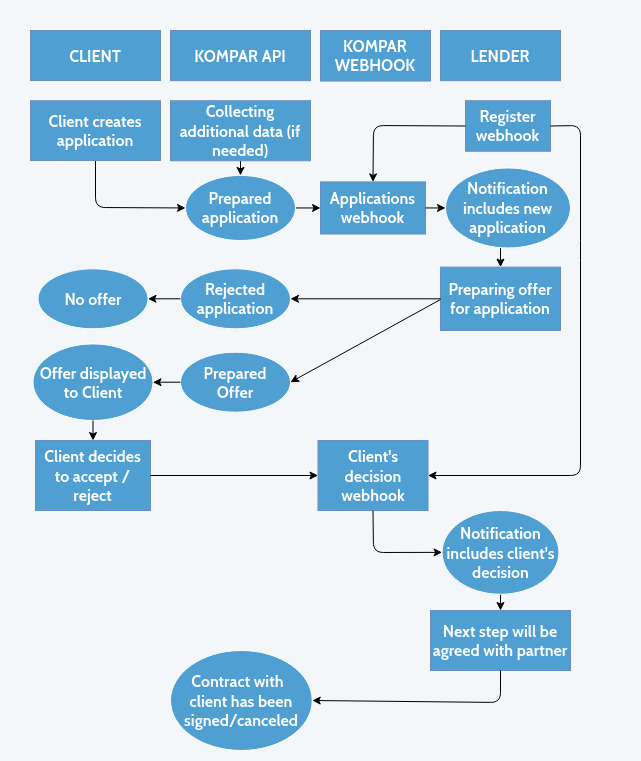
Kompar provides webhooks to alert of changes regarding clients' applications. These are POST requests to your server that are sent as soon as an event occurs. The body of the request contains details of the event.Applications webhook
To register applications webhook you have to make call towards the endpoint:
POST url/webhooks/applications
The header of this POST request in addition to the required authorization header must contains the following parameter:
Header
Content-Type
Value
application/json
The body of this POST request must contain the following parameter:
Body
url
string
Value
The url that will listen to notifications (must be HTTPS).
On success, the response has the status code 200 OK and the following JSON data in the response body:
Key
success
boolean
Description
true
On error, the response has the status code 400 NOT FOUND and the following JSON data in the response body:
Key
success
boolean
Description
false
message
string
Message about error.
For INTERNAL SERVER ERROR the response has status 500 and returns no data.
An example request to the applications webhook endpoint will look something like this:
Response to the applications webhook endpoint will look like this:
                                    {

                                       "success": true

                                    }
Client's decision webhook
To register decisions webhook you have to make call towards the endpoint:
POST url/webhooks/decisions
The header of this POST request in addition to the required authorization header must contain the following parameter:
Header
Content-Type
Value
application/json
The body of this POST request must contain the following parameter:
Body
url
string
Value
The url that will listen to notifications (must be HTTPS).
On success, the response has the status code 200 OK and the following JSON data in the response body:
Key
success
boolean
Description
true
On error, the response has the status code 400 NOT FOUND and the following JSON data in the response body:
Key
success
boolean
Description
false
message
string
Message about error.
For INTERNAL SERVER ERROR the response has status 500 and returns no data.
An example request to the decisions webhook endpoint will look something like this:
Response to the decisions webhook endpoint will look like this:
                                    {

                                       "success": true

                                    }
Remove webhook
To remove application webhook you have to make call towards the endpoint:
DELETE url/webhooks/applications
To remove decisions webhook you have to make call towards the endpoint:
DELETE url/webhooks/decisions
On success, the response has the status code 200 OK and the following JSON data in the response body:
Key
success
boolean
Description
true
On error, the response has the status code 400 NOT FOUND and the following JSON data in the response body:
Key
success
boolean
Description
false
message
string
Message about error.
For INTERNAL SERVER ERROR the response has status 500 and returns no data.
An example request to the delete webhook endpoint will look something like this:
Response to the delete webhook endpoint will look like this:
                                    {

                                       "success": true

                                    }
Webhook security
After registering webhook you will receive event as soon as it occurs. The request authorization header will have a token. You should verify the token on your server to prevent attackers from imitating valid webhooks.The header of our requests will have the following parameters:
Header
Authorization
Value
token xxxxx-yyyyy-zzzzz
(this token was provided for you during registration)
Content-Type
application/json
An example cheking of token will look something like this:
Application details
Application sent to you via webhook will always have the same structure. The body JSON will has the following fields:
Key
data
string
Description
Base64 string which includes ecrypted application
iv
string
Base64 string which includes initialization vector
You will have to decrypt data using provided key.
Sample code may look something like this:
The decrypted JSON will have the following fields:
Key
application_id
string
Description
Id of application in Kompar's system.
name
string
The full name of the client.
company_id
string
The Swedish Business Registration Number (Organisationsnummer).
company_name
string
The name of client's company.
company_type
string
The type of client's company.
company_revenue
float
Monthly revenue of client's company.
company_age
float
The age of client's company.
amount
int
The amount requested by the client.
duration
int
The desired repayment term requested by the client (in months).
purpose
string
The purpose of the application. Available options you may find in the option lists section.
ssn
string
Personal id of applicant
guarantors
array of { "ssn": string }
Guarantors
company_last_year_revenue
floatcompany_description
stringattachments
array of stringsmortgage_amount
floatproperty_existens
description_of_property
textClient's decision details
Client details sended to you via webhook will always have the same structure. The body JSON will have the following fields:
Key
application_id
string
Description
accepted
booleanIf offer is accepted you will receive as well:
Fields and actions will be determined with lender.
Confirmation of receiving
Upon receiving a webhook notification, you should acknowledge success by responding with an HTTP 200 response within 10 seconds. Otherwise, we will attempt to resend the notification 4 times according to the following schedule:- 30 seconds after the first attempt
- 2 minutes after the second attempt
- 15 minutes after the third attempt
- 1 hour after the fourth attempt
Offer
This section shows how to send offer for specific application after receiving it from webhook.
All requests require authentication.
All requests require authentication.
Send offer
To send an offer for application you have to make call towards the endpoint:
POST url/offer
The header of this POST request in addition to the required authorization header must contain the following parameter:
Header
Content-Type
Value
application/json
The body of this POST request must contain the following parameter:
Body
application_id
string
Value
The id of application existed in our system.
is_offer_available
boolean
Do you have offer for this application? True means you have prepared an offer. False means that application is rejected.
loan_type
string
Should be either "credit line" or "annuity". Defaults to "annuity".
If you prepared offer for application you have to additionally provide following mandatory fields:
Annuity loan
granted_amount
int
The amount you have granted for client.
duration
int
The duration of loan you have granted.
guarantors
int
Amount of guarantors 0-2 (if partial guarantee, enter 0.2 for 20% of loan amount, 0.3 for 30% and so on).
interest_rate
float
Yearly interest rate of loan.
initial_amount
float
Initial fee for loan.
total_cost
float
The total cost to pay by client.
monthly_cost
float
The monthly cost to pay by client.
Credit line
granted_amount
int
The amount you have granted for client.
interest_rate
float
Yearly interest rate of loan.
initial_amount
float
Initial fee for loan.
guarantors
int
Amount of guarantors 0-2 (if partial guarantee, enter 0.2 for 20% of loan amount, 0.3 for 30% and so on).
The optional fields for both types of loans are:
early_repayment
boolean
Is there the opportunity to early repayment.
is_final_offer
boolean
True means that the offer is final otherwise the offer is preliminary. If you don't provide this field we assume the offer is preliminary.
requirements
array of strings
Available options: "Prel. RR & BR", "Kontohistorik" - Prel. RR & BR is a shortcut of Preliminary Profit & Loss Statement and Balance Sheet
other_info
string
Other information about requirements or relevant information about the offer
On success, the response has the status code 200 OK and the following JSON data in the response body:
Key
success
boolean
Description
true
On error, the response has the status code 400 NOT FOUND and the following JSON data in the response body:
Key
success
boolean
Description
false
message
string
Message about error.
For INTERNAL SERVER ERROR the response has status 500 and returns no data.
An example request to the offer endpoint will look something like this:
Response to the offer endpoint will look like this:
                                    {

                                       "success": true

                                    }
Get all your offers
To get all your offers you have to make call towards the endpoint:
GET url/offer/:application_id
The header of this POST request in addition to the required authorization header must contain the following parameter:
Header
Content-Type
Value
application/json
Edit offer
To edit offer you have to make call towards the endpoint:
PATCH url/offer/:offer_id
The header of this POST request in addition to the required authorization header must contain the following parameter:
Header
Content-Type
Value
application/json
The body of this PATCH request must contain the following parameter:
Body
status
string
Value
Enum: 'Canceled', 'Signed', 'Final', 'Preliminary'
The optional field:
reason
string
Reason of canceling.
Methods related to application
All requests require authentication.
Close application
If you want to withdraw an offer for a given application or you didn't sign a contract with client use that method to notify us.
POST url/applications/close
The header of this POST request in addition to the required authorization header must contain the following parameter:
Header
Content-Type
Value
application/json
The body of this POST request must contain the following parameter:
Body
application_id
string
Value
The id of application existed in our system.
The optional field:
reason
string
Reason of canceling.
Application is signed
After signing contract with the client use that method to notify us.
POST url/applications/signed
The header of this POST request in addition to the required authorization header must contain the following parameter:
Header
Content-Type
Value
application/json
The body of this POST request must contain the following parameter:
Body
application_id
string
Value
The id of application existed in our system.
Option lists
This section includes all option lists available through API.
Loan purpose
Available loan purposes:- Anledning till lån
- Anställa personal
- Betala leverantörer
- Betala löner
- Förvärv
- Generell likviditet / kassaflöde
- Hemsida / marknadsföring
- Inköp av lager
- Inköp av maskiner
- Oväntade utgifter
- Renovering
- Säsongsinvestering
- Omfinansiering av lån / samla lån
- Övrigt
How to test API?
Test environment which is available after /test path, provides some additional methods to make testing easier. These methods try to simulate the real system. We highly recommend to use them before changing your system to production environment.
All requests require test authentication.
All requests require test authentication.
Get random application
Let's assume you have correctly registered to the application webhook but how to check if application comes correctly to your provided url. This method will send a random fake application to the url you have provided during registering application webhook. You will be able to check if your system correctly receive the application and correctly decrypted it.
GET url/random/application
On success, we will send a random application to your url. The application will look exactly the same as described under paragraph Webhooks -> Application details. You don't have to confirm receiving like in webhook.
Get random decision
Let's assume you have correctly registered to the decision webhook but how to check if client's decison comes correctly to your provided url. This method will send a random fake decision to the url you have provided during registering decision webhook.
GET url/random/decision
On success, we will send a random decision to your url. The decision will look exactly the same as described under paragraph Webhooks -> Client's decision details. The decision will be always accepted. You don't have to confirm receiving like in webhook.
Testing the entire flow
After configuring method for receiving applications and decision you will be able to test the entire flow I.e.- Receive test application
- Make offer or reject application
- Receive decision of client
I. To start the flow make a call to the endpoint:
GET url/flow/start
II. To receive test application to the url you have provided during registering application webhook you have to call the endpoint:
GET url/flow/application
Remember to save application id. You will need that id in the next step - creating offer.
III. After receiving application you are able to create an offer. To send the offer you should use method from paragraph Offer -> Send offer. Remember to provide all mandatory fields. You can also reject the application. In that case there won't be next steps.
IV. From now you can close application using method from paragraph Methods related to application -> Close application.
V. To receive decision to the url you have provided during registering decision webhook you have to call the endpoint:
GET url/flow/decision
The decision may be accepted or unaccepted.
VI. If decision is accepted from now you can sign application using method from paragraph Methods related to application -> Application is signed. You can still close application using point IV. If decision is unaccepted the flow is finished.
VII. If you want to start from the beginning you just have to perform instruction from point I.